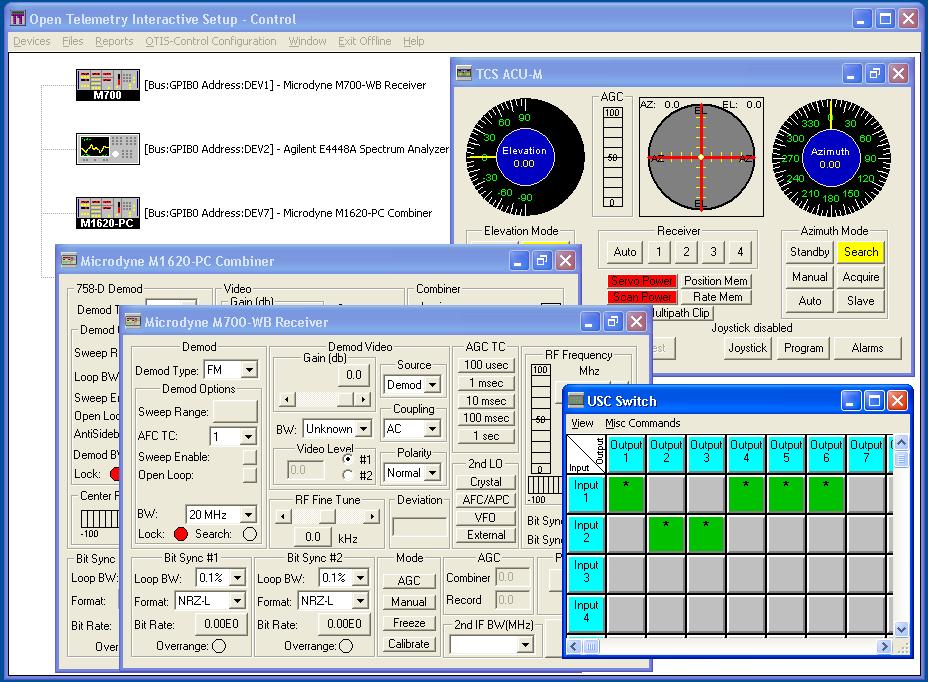
OTIS-Control is a Windows-based application to setup, monitor, and control various telemetry equipment remotely. OTIS-Control supports
a variety of equipment currently on the market. New devices not currently supported can be added based upon customer demand.
The OTIS-Control software currently supports a variety of devices, including:
Box and Board-Level Telemetry Receivers
Box and Board-Level Telemetry Combiners
Data Recording Devices
Antenna Controllers
Bit Synchronizers
Miscellaneous Test Equipment
Miscellaneous Threat Simulators
OTIS-Control Features
The OTIS-Control software system is unique in its ability to support
a wide variety of hardware devices in both an off-line and a Real-Time mode
of operation. Some of the unique features of OTIS-Control are presented below:
OTIS-Control provides an interactive mechanism for the operator to define and maintain his hardware system configuration.
OTIS-Control allows the user to define Mission Configuration Files, which are used to set up all configured devices with one command.
OTIS-Control maintains a log of mission events (changes made to devices, etc.) and provides a printed output of all
critical mission information upon request.
OTIS-Control supports devices that can be remotely controlled by many interfaces, including IEEE-488, RS-232, RS-488 and ethernet.
OTIS-Control report tools allow the user to generate reports containing:
General mission information
Device configuration
Device setup information
Mission start and stop times
Acquisition and loss of signal events
Changes made to any device being controlled
When configured with an antenna controller, and receiver(s), OTIS-Control generates an Automatic Gain Control (AGC) report
for each mission containing time tagged azimuth, elevation, and AGC level readings at a user-specified sampling rate.
Scenario Generator: This feature allows users to easily create and customize complex test scenarios. These scenarios automatically
control multiple devices in a scripted timeline of events.
The OTIS-Control software consists of two (2) primary components:
The OTIS-Control Setup and Configuration Manager which provides file
management of the setup information for all configured devices, device
configuration control, on-line and off-line setup, and a variety of report generation features, and;
Device windows which provide the direct interface to the device which is under control.
Due to this design structure, OTIS-Control can be offered in either
a "Stand Alone" or "Integrated" format. The differences
between these offerings is described below.
Stand Alone The stand alone device window provides the user
with a convenient "Window" containing a graphical
representation of the setup information required for the individual
hardware component. Through this graphical interface, the user may
control the device interactively using the mouse and keyboard and be
presented with the current status of the device. These stand alone
interfaces do not maintain historical setup information, however they
provide the user with control over all devices individually from a
common PC interface.
Integrated Each OTIS-Control stand alone window is also
offered as an integrated module with the OTIS-Control System Software.
This provides the user with a fully integrated and configurable software
system to maintain setup for multiple devices. In addition, an
OTIS-Control file system maintains the individual module's setup
information. This information can then be retrieved and used for
similar missions. In the integrated form, each device module still
provides a fully interactive setup of its associated device.
OTIS-Control Supported Devices
The following devices which are currently supported by the OTIS-Control software system:
Antenna Controllers:
EMP ACU-6
EMP ACU-21
TCS ACU-M
Datron
Microdyne ACU-2000
Bit Synchronizers:
Acroamatics 2430V
Aydin A3335
Aydin AVME335 (VME)
Lockheed-Martin MBS-720
Combiners:
Microdyne 1620
Microdyne 1670
Microdyne 3200
Microdyne 3220
Microdyne VMC-2000
Decommutators:
General Data Products (GDP) FSD001 (VME)
Demultiplexers:
Metraplex DFD
GPS Receivers:
Datum TFP001 (VME)
Receivers:
Microdyne 700-MR
Microdyne 700-WB (Wide Band)
Microdyne 1200-MR
Microdyne 1200-MRCA
Microdyne 1400-MRA
Microdyne 1400-WB (Wide Band)
Microdyne 2800
Microdyne VMR-2000
Signal Generators:
Microdyne TSS-2000
Agilent E82x7D
Spectrum Analyzers:
Agilent E4448A
Strip Chart Recorders:
Gould TA5000
Switches:
Universal Switching Corp (USC) Model 11276 32x32 Switching Array
Universal Switching Corp (USC) Model S2560 256x256 Switching Array
Tape Recorders:
Datatape 3700J
Honeywell 101
Threat Simulators:
Exelis AN/PLM-4 Radar Signal Simulator(RSS)
Hydra Laser Warning Receiver
MEON Directional Infrared Countermeasure Flight Line Test Set